Building Rich Tutor: From an Animated Math Lesson to a Production Learning Platform
A detailed engineering case study on evolving Rich Tutor from an animated long-division lesson into a production learning platform with Flask, Docker, AWS, CI/CD, pytest, D2 architecture, Playwright screenshots, parent/student portals, and automated deployment.

Building Rich Tutor: From an Animated Math Lesson to a Production Learning Platform

Rich Tutor started with a very small question:
What would it look like to teach long division visually, step by step, in a way that a child could actually follow?
That question eventually became a much larger engineering project.
What began as a single Manim animation grew into a production learning platform with animated lessons, guided tutoring, generated practice, mastery tracking, student accounts, parent reporting, administrator tools, invitation links, persistent grades, study-time tracking, Docker deployment, GitHub Actions CI/CD, a published container image, D2 architecture documentation, Playwright screenshots, and a live AWS deployment.
Production:
https://tutor.richmackos.com
GitHub:
https://github.com/iamrichmack111/rich-tutor
From One Math Lesson to a Platform
The first Rich Tutor lesson focused on traditional long division.
Instead of showing only:
864 ÷ 4 = 216
the goal was to show the actual process:
        216
      ______
4  )  864
The instructional shortcut became:
How many?
Times.
Take away.
Drop.
That established the core design principle for Rich Tutor:
Show the learner both what happens and what they should remember.
Manim made this useful because the learner could see quotient digits move into place, subtraction happen in sequence, and the next digit drop down.
Curriculum Expansion
Once the long-division model worked, Rich Tutor expanded into:
- fractions
- remainders
- percentages
- ratios
- cross multiplication
- algebra
- statistics
- trigonometry
- calculus
- chemistry
- Linux commands
- PMP mathematics
The system therefore evolved from a single animation into a reusable lesson engine.
The learning flow became:
Subject
  ↓
Lesson
  ↓
Visual Explanation
  ↓
Shortcut
  ↓
Guided Tutor
  ↓
Generated Practice
  ↓
Grade Event
  ↓
Mastery
Different Subjects Need Different Visual Languages
One of the first design problems was trying to use one generic animation style for everything.
That was not enough.
Linux lessons benefit from a simulated terminal. Calculus needs graph-based visuals. Chemistry benefits from molecule and equation relationships. Trigonometry needs triangle geometry. PMP mathematics benefits from project-performance dashboards.
So Rich Tutor began sharing a common learning structure while allowing subject-specific visual behavior.
That became a much stronger design than forcing every lesson into one generic renderer.
Guided Tutor and Practice
Rich Tutor added Guided Tutor mode so the learner is not just watching.
A lesson can pause and ask:
What should happen next?
The learner can answer, request a hint, reveal a step, and continue.
Generated practice extends the same concept into repeated attempts.
The lesson model became:
Watch
  ↓
Understand
  ↓
Predict
  ↓
Practice
  ↓
Demonstrate mastery
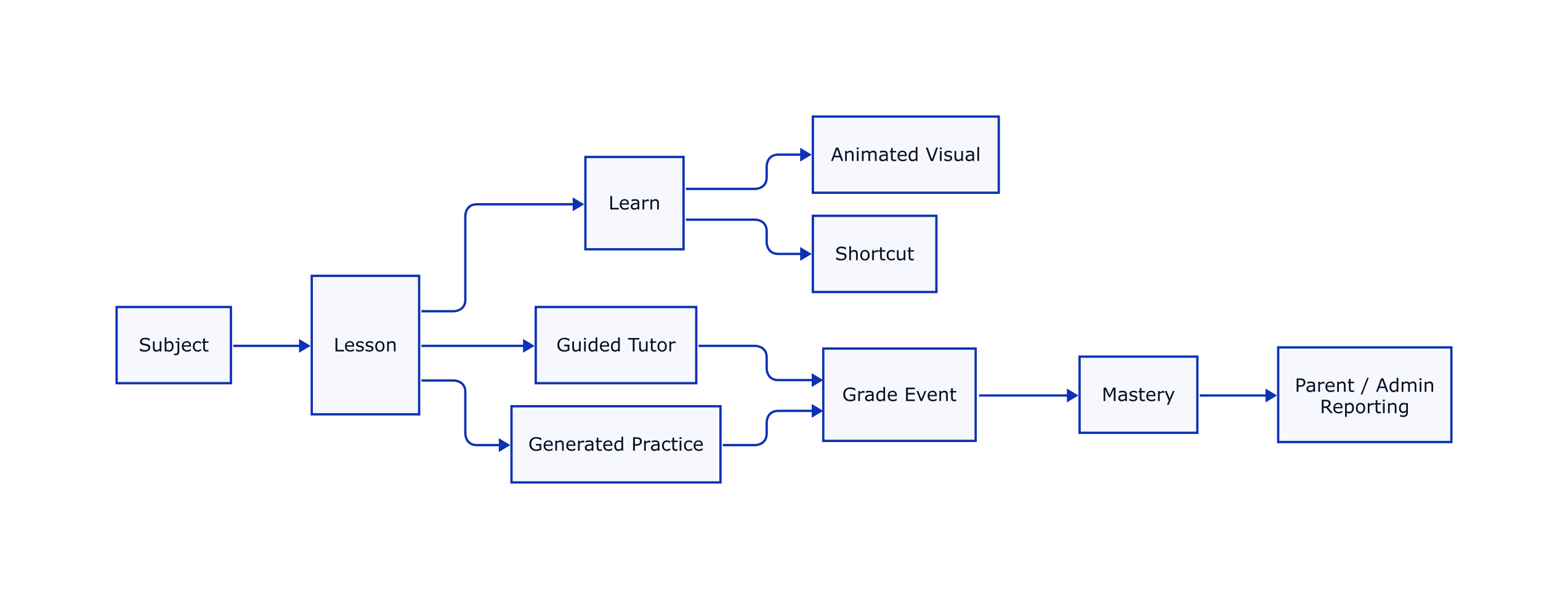
Mastery can then represent meaningful learning progression rather than simply whether a page was opened.
Accounts, Parents and Students
As soon as Rich Tutor began tracking grades, mastery, and study time, anonymous browser storage was no longer enough.
The platform introduced three primary roles:
Administrator
Parent
Student
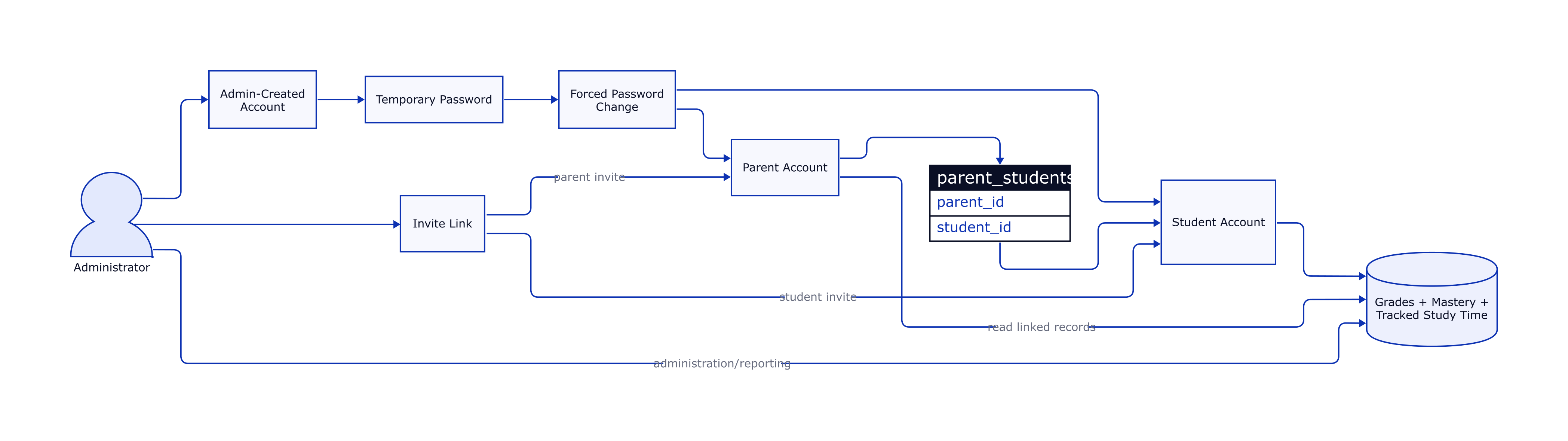
Administrators can create users, reset passwords, disable accounts, generate invitation links, and manage family relationships.
Parents can view information for linked students.
Students use lessons and generate persistent learning records.
This transformed authentication from a simple login feature into part of the educational data model.
Administrator Portal
The administrator dashboard became a central part of the platform.
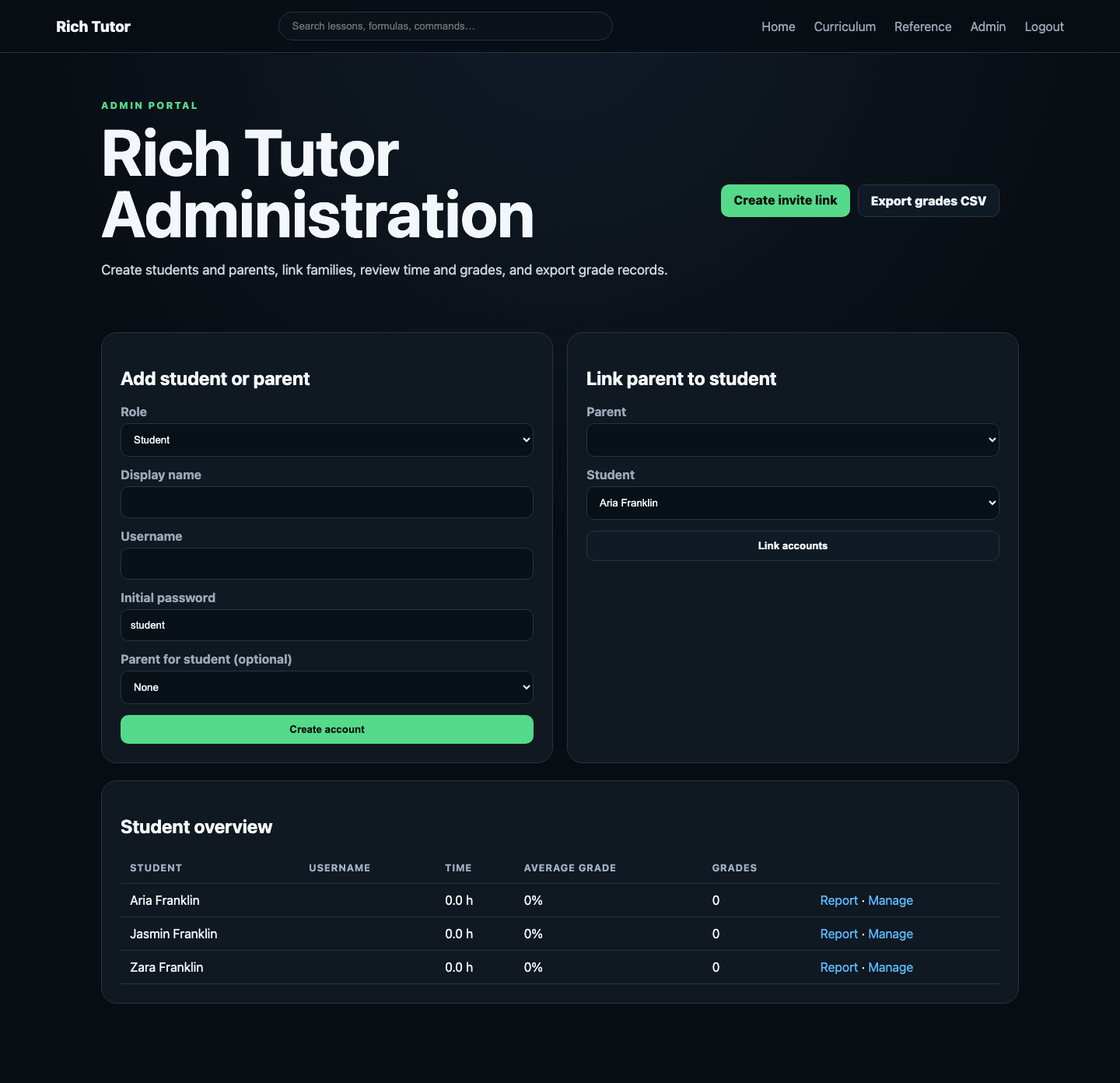
Administrators can manage:
- students
- parents
- usernames
- temporary passwords
- password resets
- account state
- parent/student links
- invitation links
- grades
- mastery
- study-time records
- CSV exports
This moved Rich Tutor well beyond a lesson viewer.
Invitation Links
Rich Tutor also gained one-time invitation URLs.
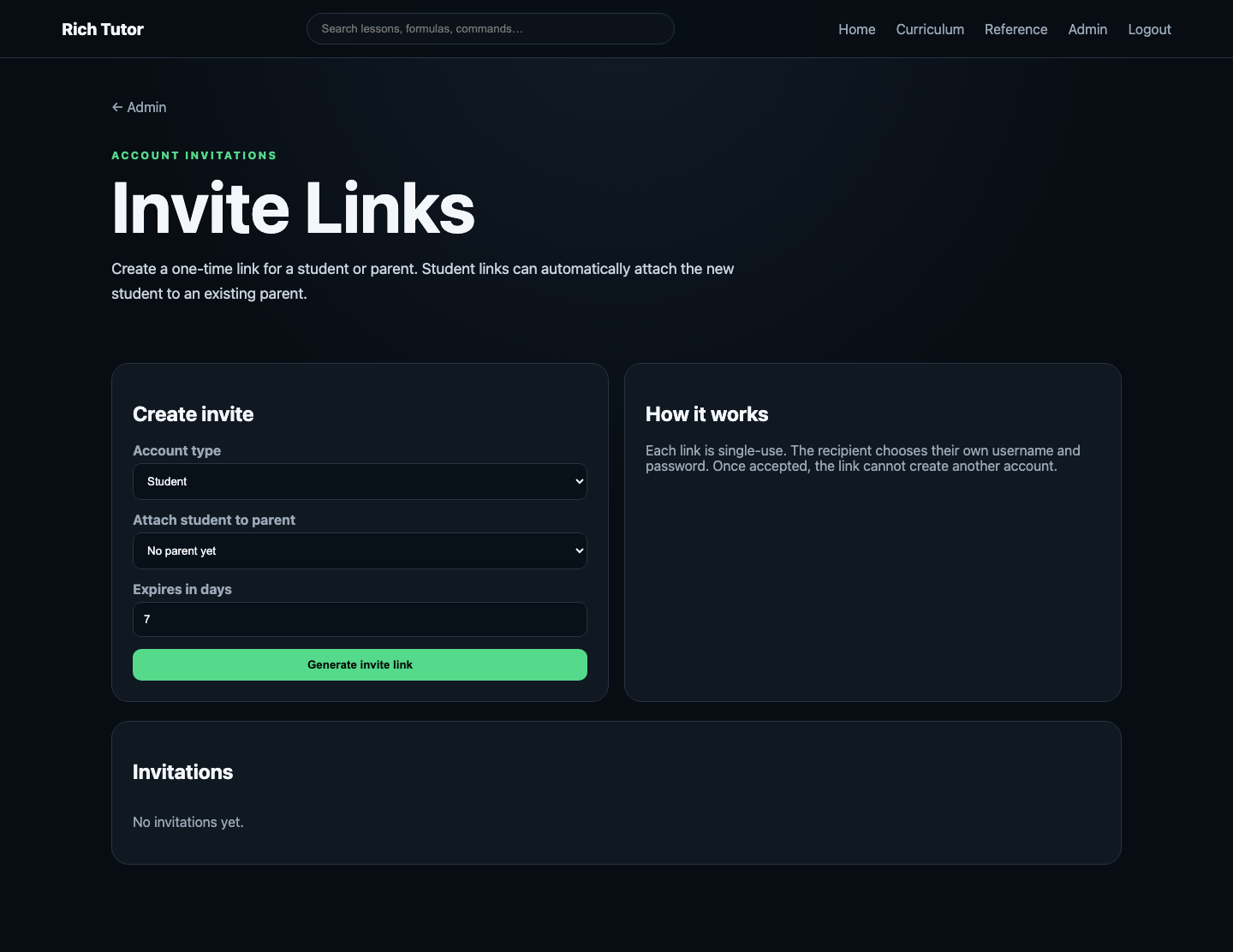
An administrator can create either a parent or student invitation.
Student invitations can optionally be associated with an existing parent.
The recipient chooses their own credentials, and the token becomes unusable after acceptance.
This provides a cleaner onboarding mechanism than manually distributing permanent credentials.
Forced Password Rotation
Administrator-created accounts may begin with temporary passwords.
Those accounts are marked with:
must_change_password = 1
After the first successful login, the user is redirected to the password-change screen.
Normal application access is blocked until a new password is chosen.
Password resets use the same mechanism.
The flow is:
Administrator creates account
          ↓
   Temporary password
          ↓
      First login
          ↓
must_change_password = 1
          ↓
   Change password
          ↓
New password is hashed
          ↓
must_change_password = 0
          ↓
   Normal application
This turns the temporary password into an actual temporary credential rather than a permanent shared secret.
Production Architecture
Rich Tutor eventually moved into a containerized production environment.
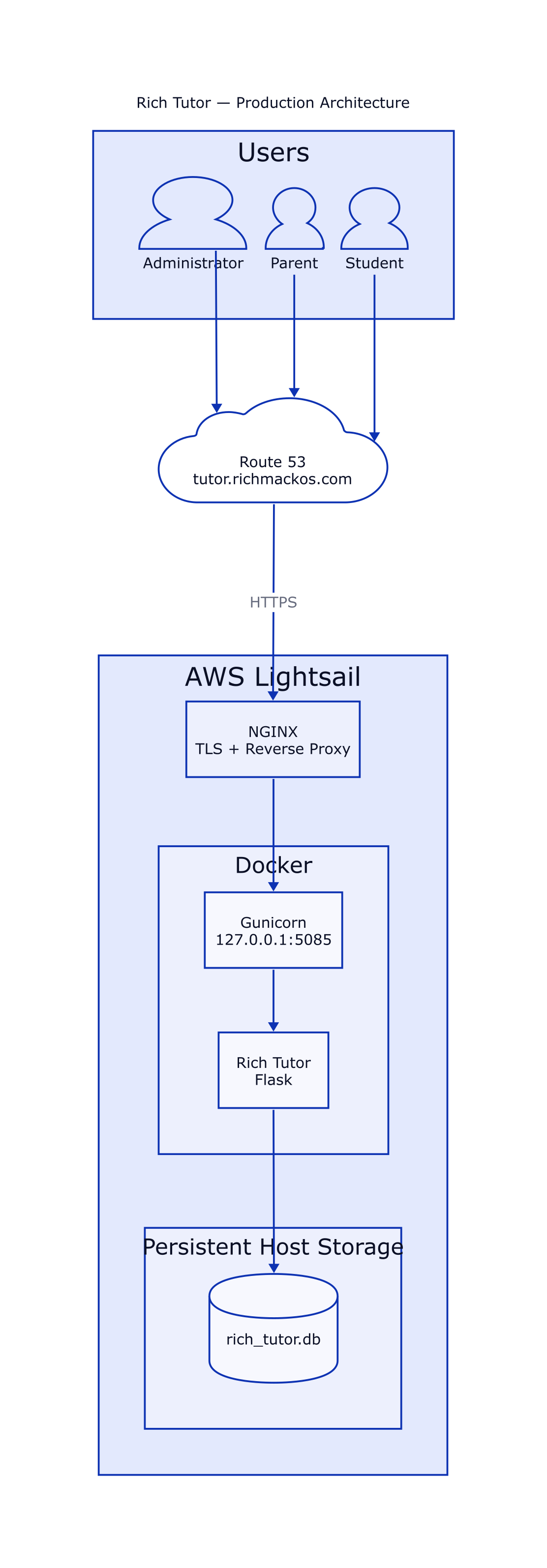
The request path is:
Browser
   ↓
tutor.richmackos.com
   ↓
Route 53
   ↓
NGINX
   ↓
127.0.0.1:5085
   ↓
Gunicorn
   ↓
Flask
   ↓
SQLite
The application runs on AWS Lightsail.
Gunicorn is not directly exposed to the public Internet.
Docker binds the application to loopback while NGINX handles the public web interface.
This separates:
- public HTTP/HTTPS
- TLS
- reverse proxying
- application serving
- persistent application state
Persistent SQLite
Containers are disposable.
Educational records are not.
Rich Tutor stores persistent data outside the application container in:
/home/ubuntu/rich-tutor/data
The production database is:
data/rich_tutor.db
That database stores information including:
- users
- roles
- parent/student relationships
- invitations
- grades
- mastery
- study sessions
The application container can therefore be rebuilt without intentionally deleting student data.
A Real Production Bug: SQLite Permissions
One of the most useful production failures came from Linux filesystem ownership.
The host data directory was owned by UID 1000.
The container process ran as UID 10001.
SQLite failed with:
sqlite3.OperationalError: unable to open database file
The problem was not Flask.
The problem was not Gunicorn.
The problem was not SQLite itself.
The mounted filesystem permissions did not match the identity of the process attempting to write the database.
The solution was to correct ownership so the runtime container user could write to the persistent directory.
More importantly, that fix became part of the deployment workflow.
This produced an important operational principle:
A deployment repair is stronger when the deployment system learns the repair.
Health Checks
Rich Tutor exposes:
/health
A successful response is:
{"app":"Rich Tutor","status":"ok"}
This endpoint is used by the deployment system to determine whether the application has actually become available.
The same contract can be used by:
- Docker
- richdeploy
- GitHub Actions
- production monitoring
richdeploy
Rich Tutor was added to the server-side Richmack deployment utility:
richdeploy tutor
The deployment process understands the application's production contract:
APP_DIR = /home/ubuntu/rich-tutor
PORT    = 5085
DB_FILE = data/rich_tutor.db
SERVICE = rich-tutor
Its responsibilities include:
- locating the application;
- preserving persistent data;
- backing up SQLite;
- correcting data-directory ownership;
- validating the application;
- rebuilding Docker;
- recreating the service;
- polling the health endpoint;
- showing useful diagnostics when deployment fails.
This keeps production-specific operational knowledge on the server rather than duplicating every implementation detail inside GitHub Actions.
GitHub Actions CI/CD
The normal development workflow became intentionally simple:
git add .
git commit -m "Describe the update"
git push
GitHub Actions takes over after the push.

The pipeline performs a sequence similar to:
git push
   ↓
Checkout
   ↓
Python validation
   ↓
pytest
   ↓
Secret scan
   ↓
Docker build
   ↓
SSH
   ↓
rsync
   ↓
richdeploy tutor
   ↓
Local health check
   ↓
Public HTTPS health check
This creates a direct path from source control to production while still placing validation gates before deployment.
Testing Found Bugs Health Checks Could Not
The pytest suite proved useful almost immediately.
One bug existed in fresh database initialization.
The administrator SQL insert expected six values but the initialization tuple supplied only five.
Production did not initially expose the problem because production already contained an administrator record.
A clean test database did.
The tests also exposed authentication regressions where protected curriculum could become publicly accessible and temporary-password users could bypass forced password rotation.
The application could still return a successful health response while those behaviors were wrong.
That distinction matters:
Availability testing proves the process is running. Behavioral testing proves the application is doing the right thing.
Rich Tutor's tests cover important application behavior including:
- health
- administrator login
- invalid login
- protected curriculum
- administrator authorization
- invitation access
- invitation creation
- temporary password enforcement
- administrator password resets
CI Problems Became Engineering Lessons Too
The CI pipeline itself exposed several problems.
Python Import Path
Pytest initially failed on GitHub Actions with:
ModuleNotFoundError: No module named 'app'
The repository root needed to be available through PYTHONPATH.
Secret Scanner Self-Matching
The basic secret scanner initially detected its own regular expression inside the workflow file.
It later detected intentionally fake credentials inside the test suite.
Those failures demonstrated an important property of automated security checks:
A security check should be strict enough to catch real mistakes but precise enough that developers do not learn to ignore it.
The scan scope was adjusted while retaining the protection.
Container Publishing
Rich Tutor also publishes a container image through GitHub Container Registry.
The image can be distributed with:
docker pull ghcr.io/iamrichmack111/rich-tutor:latest
That changes the repository from simply containing source code into producing a deployable software artifact.
D2 Architecture as Code
Rich Tutor uses D2 for architecture documentation.
The repository contains diagrams describing:
- production architecture
- account relationships
- learning architecture
- CI/CD
- project evolution
Because D2 diagrams are source files, architecture changes can be handled like application changes:
edit
  ↓
render
  ↓
review
  ↓
commit
  ↓
push
That means architecture documentation can evolve alongside the codebase.
Playwright Documentation
Playwright is used to capture screenshots of the actual application.
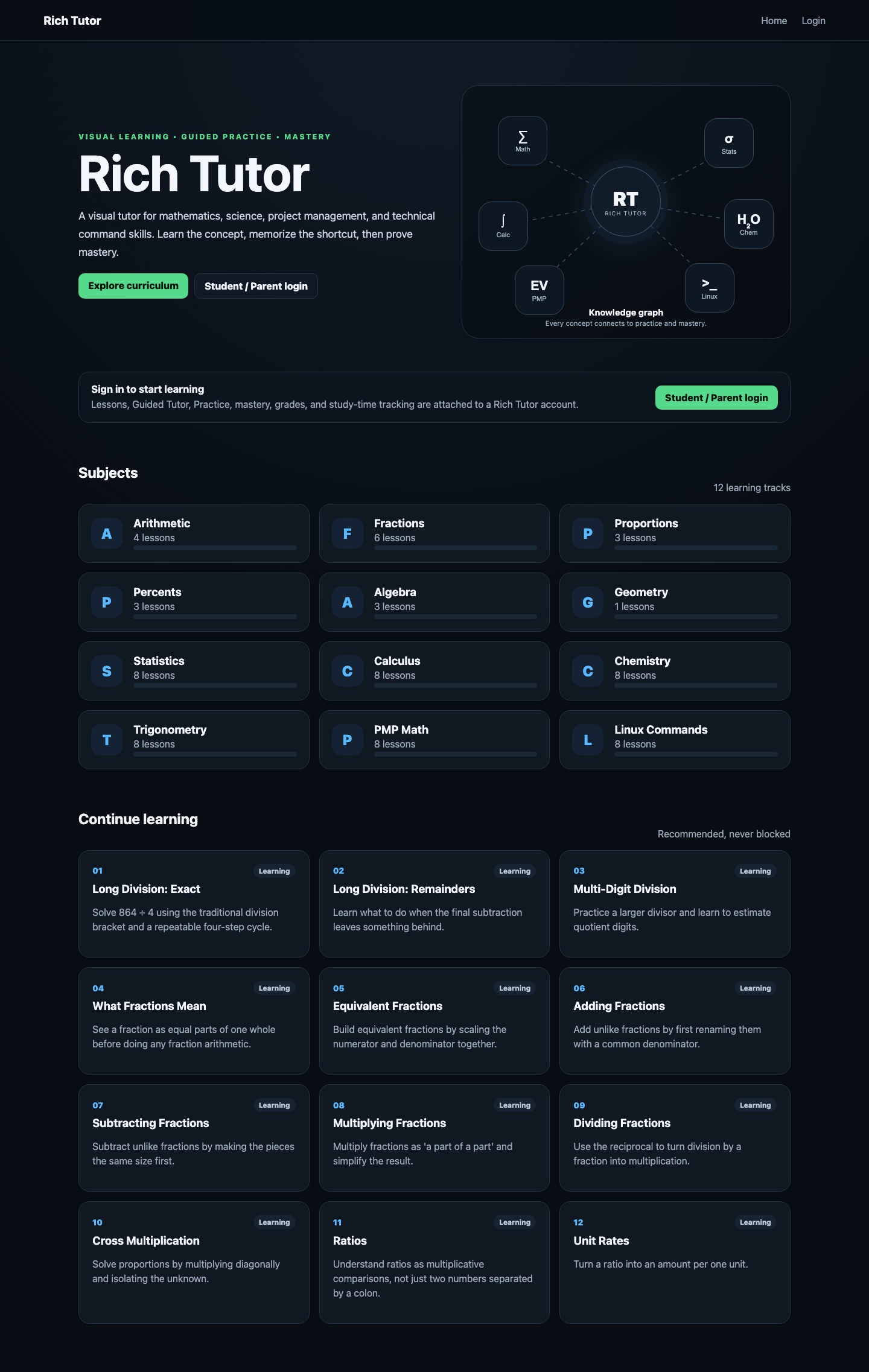
The documentation set includes screenshots for:
- home
- login
- administrator dashboard
- invitation manager
- curriculum
- reference library
- lesson
- subject dashboard
This is significantly stronger than relying exclusively on hand-created mockups because the documentation shows the actual application.
Curriculum Interface
The curriculum provides access to the growing collection of Rich Tutor subjects and lessons.

As the number of lessons increased, navigation itself became an architectural concern.
Subjects therefore became organizational units rather than merely labels attached to lessons.
Reference Library
The application also includes a reference-oriented interface.

This allows the curriculum to function both as full instruction and as a quick technical reference.
That is especially useful for subjects such as Linux and PMP where a learner may already understand the concept but need to recall a command or formula.
Lesson Experience
The lesson page combines instruction with the visual learning system.
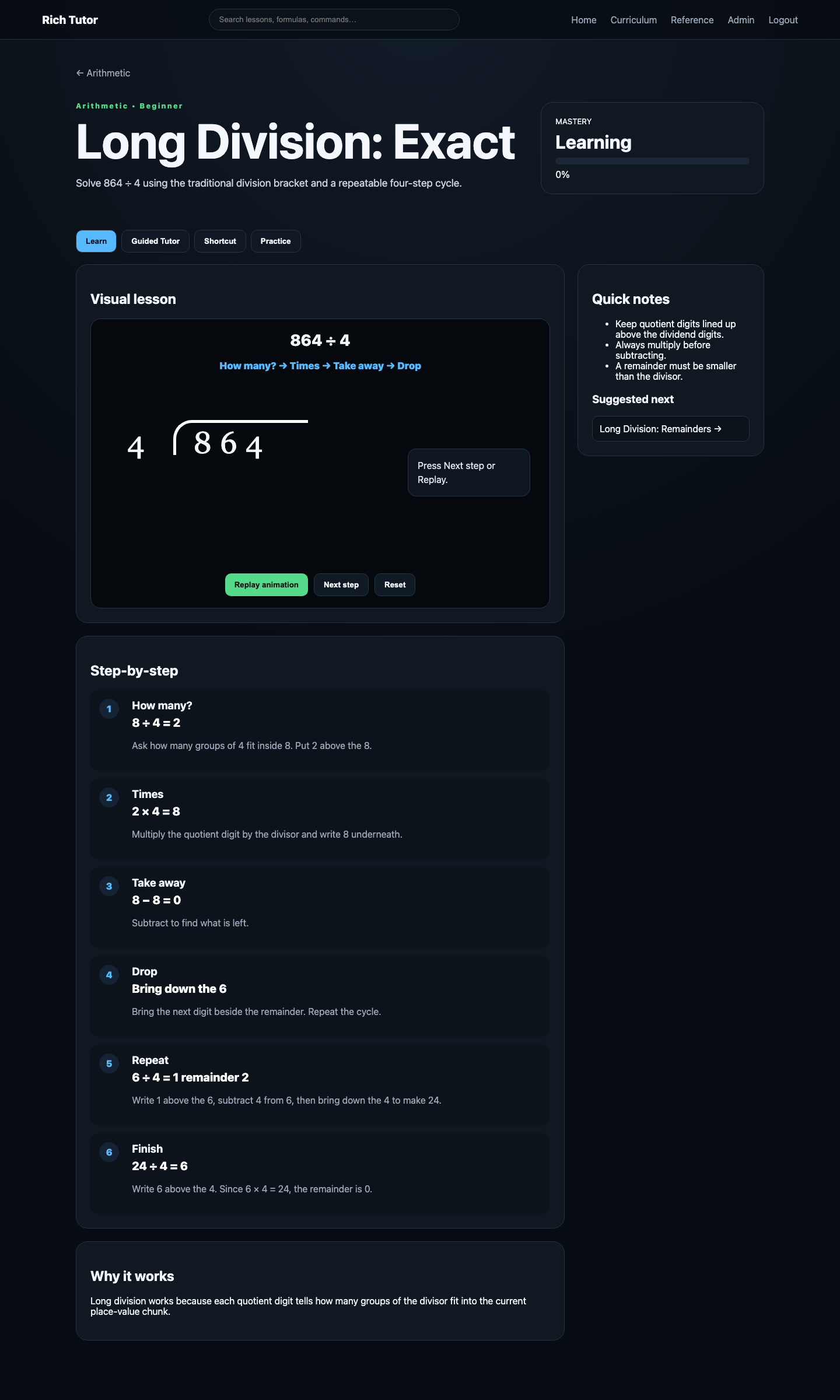
The objective is not simply to display information.
The lesson should move the learner through:
Explanation
     ↓
Visualization
     ↓
  Shortcut
     ↓
Guided reasoning
     ↓
  Practice
     ↓
  Mastery
Subject Dashboards
Individual subject dashboards give each curriculum area its own identity.
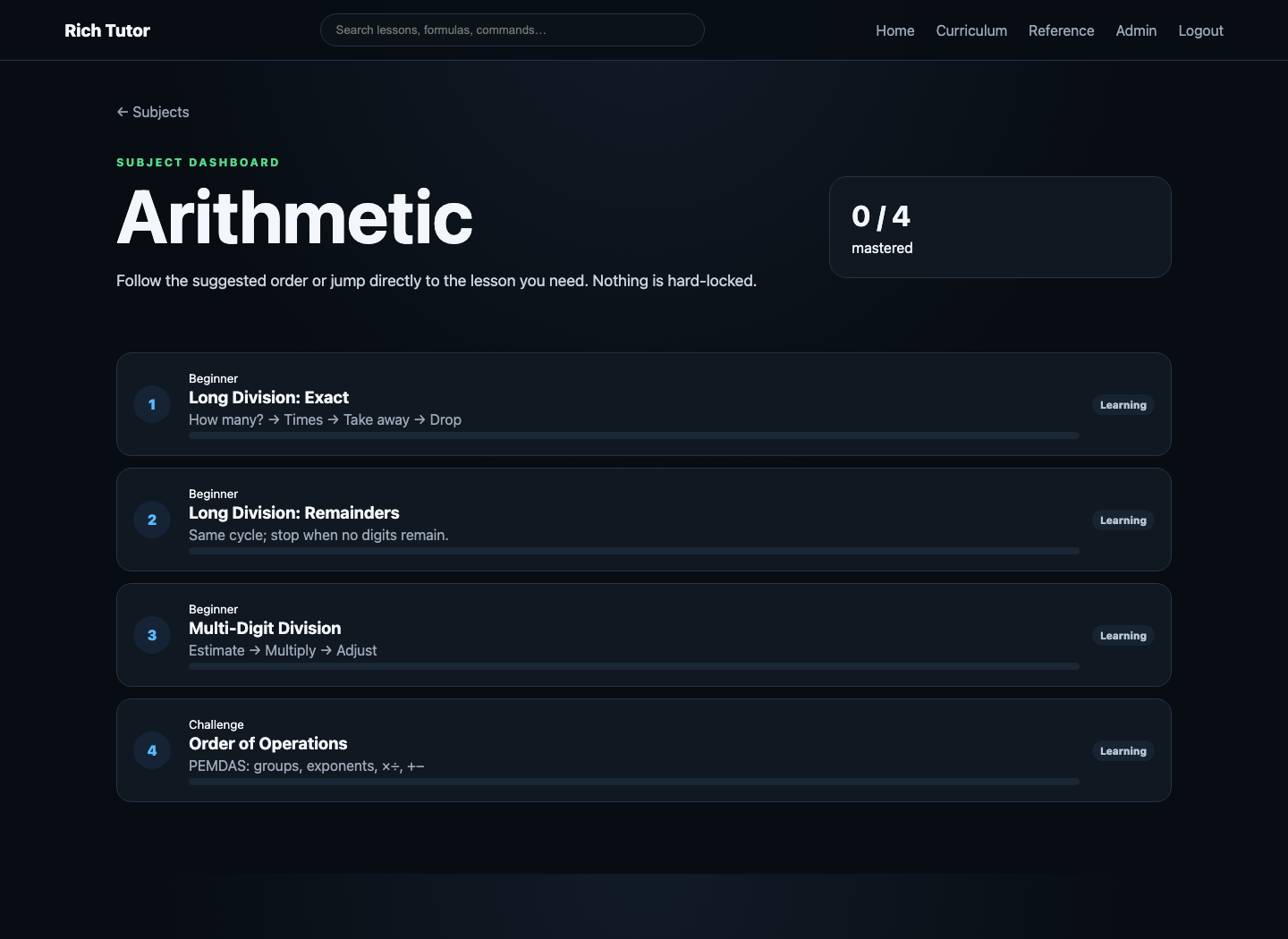
This becomes increasingly important as Rich Tutor grows because Linux, Chemistry, Statistics and Calculus are fundamentally different learning environments even though they share the same underlying platform.
Manim and D2 Solve Different Problems
Two visualization technologies became particularly useful.
Manim is useful when the learner needs to understand a transformation over time.
Examples include:
- long division
- algebraic manipulation
- fraction relationships
- graph changes
D2 is useful when someone needs to understand relationships.
Examples include:
- application architecture
- CI/CD
- account relationships
- infrastructure
- conceptual maps
The distinction is:
Manim
  ↓
Transformation over time

D2
  ↓
Relationships and architecture
Using both gives Rich Tutor a visual language for education and engineering.
Current Architecture
Rich Tutor now contains several connected systems.
Learning
Subjects
Lessons
Visuals
Shortcuts
Guided Tutor
Practice
Mastery
Reference material
Identity
Administrator
Parent
Student
Invitations
Password rotation
Account state
Family relationships
Educational Data
Grades
Study sessions
Mastery
Progress
Production
Flask
Gunicorn
Docker
SQLite
NGINX
TLS
AWS Lightsail
Route 53
Engineering Delivery
Git
GitHub
pytest
Secret scanning
GitHub Actions
GHCR
richdeploy
Health verification
D2
Playwright
What Comes Next
There are several directions where Rich Tutor can continue to mature.
Formal Database Migrations
Schema changes should move toward explicit versioned migrations.
That would make database evolution more repeatable, auditable and testable.
Audit Logging
Administrator operations could produce durable audit events for actions such as:
- account creation
- password reset
- account disable
- invitation creation
- parent/student relationship changes
Backup Retention
The deployment system already understands database backups.
The next step is formal retention and documented recovery.
Version Endpoint
A production endpoint such as:
/version
could safely expose:
release version
Git commit
build timestamp
That would make it easier to prove which revision is actually running in production.
Adaptive Review
The mastery engine could eventually determine which questions a learner receives next.
For example:
Generate ten practice questions from concepts where mastery is below 80%.
That would turn progress tracking into an active component of instruction.
Larger Assessments
The assessment engine can eventually support:
- mixed-subject quizzes
- timed exams
- printable worksheets
- report cards
- spaced repetition
- assignments
The Larger Engineering Lesson
The most interesting part of Rich Tutor is its progression.
Animated math lesson
        ↓
Reusable visual teaching model
        ↓
Multi-subject curriculum
        ↓
Guided practice
        ↓
Mastery tracking
        ↓
Student accounts
        ↓
Parent/admin portals
        ↓
Persistent educational data
        ↓
Docker
        ↓
AWS production
        ↓
NGINX + TLS
        ↓
Automated tests
        ↓
CI/CD
        ↓
Container registry
        ↓
Architecture as code
        ↓
Automated visual documentation
Each requirement exposed another engineering layer.
A math animation required visual design.
Progress required persistence.
Parents required relationships and authorization.
Production required containers and reverse proxying.
Deployment required automation.
Automation required health checks.
Testing exposed regressions health checks could not.
Documentation required reproducible diagrams and screenshots.
Rich Tutor therefore became more than a tutoring application.
It became an example of taking a small educational idea through the complete software lifecycle: prototype, application architecture, data modeling, authentication, testing, containerization, cloud infrastructure, CI/CD, observability, documentation, and production operations.
That evolution is what makes the project valuable.
The original question was simply how to explain long division visually.
The resulting system became a platform for exploring how software engineering and education can reinforce one another.
Project
Production:
https://tutor.richmackos.com
GitHub:
https://github.com/iamrichmack111/rich-tutor
GitHub Wiki:
https://github.com/iamrichmack111/rich-tutor/wiki
Container:
docker pull ghcr.io/iamrichmack111/rich-tutor:latest
Cloud infrastructure, AI systems, automation, and developer tools.
Visit richmackos.com →